Automatically track your Index funds, Mutual funds and ETFs in real-time, monitor your portfolio’s returns, and stop losing hours to messy Excel spreadsheets.
Easy and useful. Yours forever. No subscriptions, no limits.
One-time payment · Instant access · Google Sheets
🛡️ 30-day money-back guarantee

✅ Compatible with ETFs, Index and Mutual funds
✅ Enter your Ticker/ISIN and get started in minutes (just 2️⃣ steps)
✅ Automatic charts and real-time tracking
✅ Ready to use—no formulas or setup required
Built for investors who want to sidestep these headaches and know exactly what’s happening with their money—without struggling through impossible spreadsheets.
📊 Automated Dashboard
Manage your Index, Mutual funds and ETFs in real-time.
⏱ Save Time & Effort
Set up your portfolio in under 5 minutes, no hassle.
🎯 Optimize Your Decisions
Track performance with automatic charts and live data.
🛠 Complete Toolkit
Start using it immediately after purchase—no setup required.
Track Your ETFs, Mutual and Index Funds in Real-Time
You won’t have to wait years to see your wealth grow. From the moment you start using this portfolio tracker, you’ll experience something far more immediate: complete control over managing your index, mutual funds and ETF investments in dollars (💲USD).
In just two steps:
☝️ STEP 1. Enter the ISIN or Ticker symbols for your mutual funds and ETFs (copy them from ft.com).
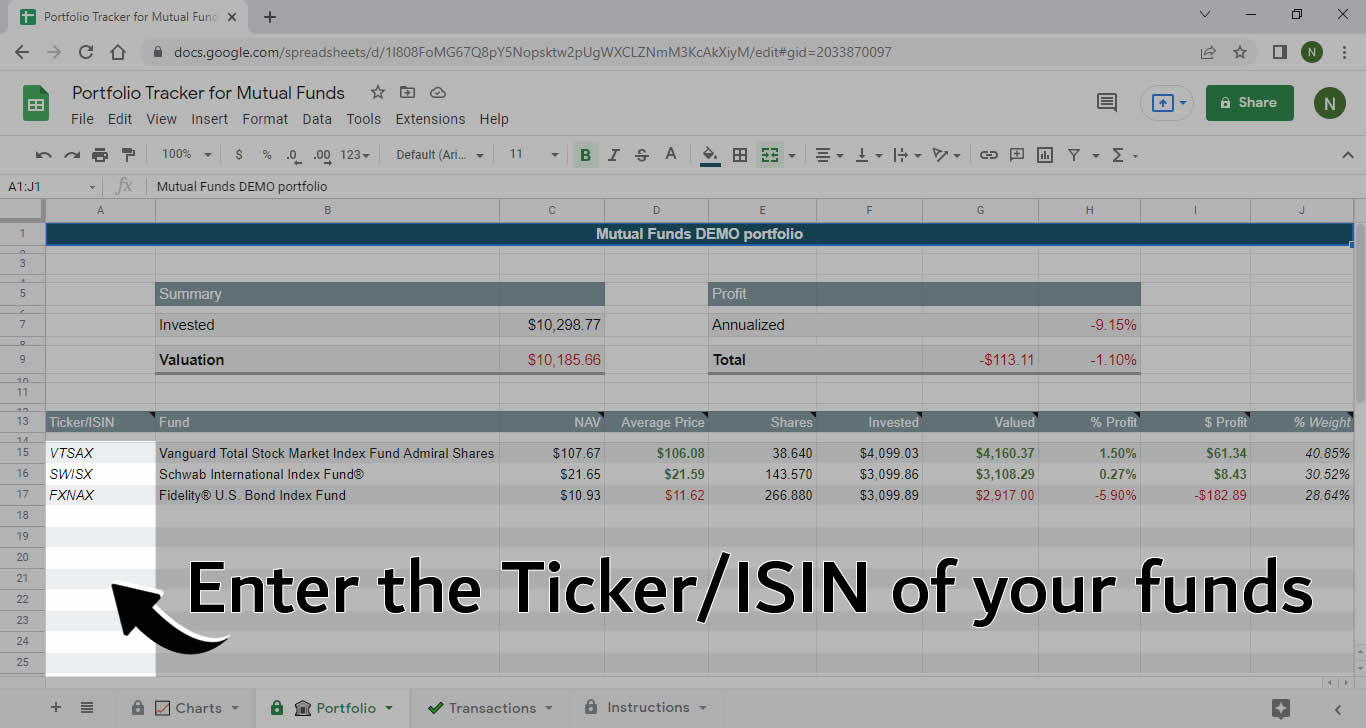
✌️ STEP 2. Add your transactions (buys or sells).
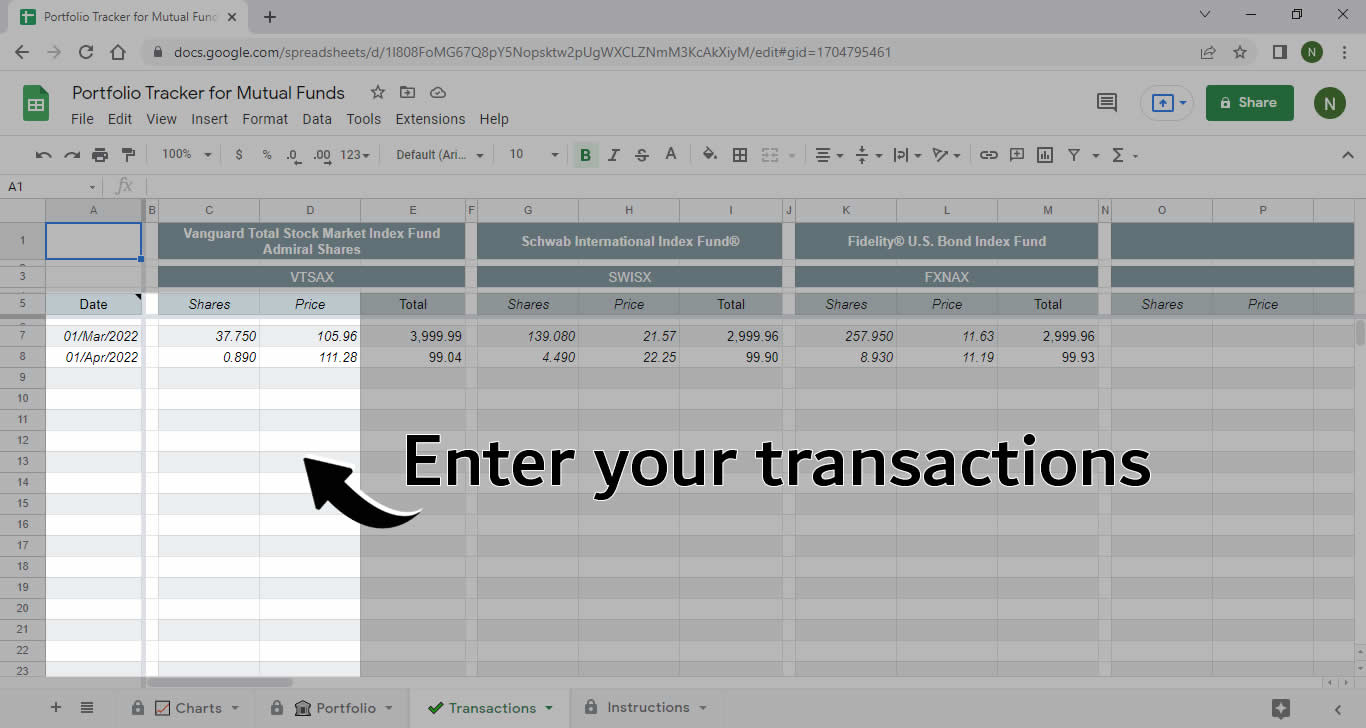
And it’s all real-time. The tracker automatically updates with live pricing from the Financial Times for each of your mutual funds and ETFs.
Once you input your transactions, the sheet automatically calculates your returns, allocation, and portfolio performance—no formulas to touch.
One-time payment · Instant access · Google Sheets
🛡️ 30-day money-back guarantee
Plus, you’ll start seeing how small improvements in your financial habits create tangible results month after month—bringing you closer to real financial peace.

Who This Template Is For
This template is perfect for you if:
✅ You invest in mutual funds or ETFs
✅ You want to track your portfolio without building a spreadsheet from scratch
✅ You want to see returns, valuation, and allocation at a glance
✅ You don’t want to mess with formulas (though you can)
It’s not for you if:
❌ You’re looking for an app that connects to your broker with your login credentials
❌ You need advanced tax automation
❌ You want professional day-trading monitoring
❌ You don’t want to use Google Sheets
🔴 The Problem With DIY Portfolio Tracking Spreadsheets
If you’ve been searching for templates to track mutual funds or ETFs, you’ve probably found spreadsheets in Excel or Google Sheets that look promising at first.
So you try one out. And then you hit the problems…
- Where do you even start? The instructions aren’t clear::
- Either they read like a manual.
- Or it seems they’re written in another language (perhaps for Martians).
- It’s impossible to understand and get running quickly.
- It’s not intuitive. You’re used to Google’s simplicity—not this.‼️
- The design is poor. It looks dated and unattractive.
- The learning curve is steep.
- You have to input dozens of variables.
- It doesn’t fit your strategy.
- It’s limited. You can only track a handful of funds.
- And when you try to add more funds, the calculations break.
- Or if you try to modify it, errors pop up everywhere: #N/A, #Div/0, etc.
- It’s extreme:
- Either it’s too basic with zero formula protection or error handling.
- Or it’s overcomplicated and impossible to use unless you’re the one who built it.
- It doesn’t follow any logical pattern.
- And if you finally decide to modify it yourself using Google’s GOOGLEFINANCE function, you discover it doesn’t work with ISIN codes.
🤬 This is when you lose it:
Look, I just want to track my funds.
Isn’t it enough to paste the ISIN/Ticker and log what I buy and sell?
I don’t care about the math behind it.
The tracker should do the rest automatically!
Why is simple so complicated? ⁉️
It’s not. See for yourself ⤵️
With this template, you control your portfolio in under 5 minutes:
1️⃣ Copy the ISIN or ticker
2️⃣ Log your buys and sells
The template calculates everything automatically.
✅ Just 2 steps
✅ No formulas
✅ No setup
✅ Ready to use
One-time payment · Instant access · Google Sheets
🛡️ 30-day money-back guarantee
Control Your Portfolio in Real-Time
Here’s your portfolio tracker to monitor your mutual funds and ETFs in real-time, starting today.
It doesn’t matter which mutual funds or ETFs you use. The tracker automatically pulls data from the Financial Times. As long as they’re listed there, you’re set. All you do is copy and paste the fund’s ISIN or ETF ticker (in 💲USD) from ft.com. The template handles everything else.
- ETF ticker example: VTSAX
- Fund ISIN example: US9229083632
How It Works [Video + Demo]
A video is worth a thousand words. So here’s your mutual fund and ETF tracker in action.
Watch this short video to see how it works, or jump straight to the demo below.
One-time payment · Instant access · Google Sheets
🛡️ 30-day money-back guarantee
Pay Once. It’s Yours Forever. No Fees, No Limits.
When you buy, you get:
✅ Instant access to the template in Google Sheets
✅ Portfolio tab to see valuation, returns, and allocation
✅ Transactions tab to log buys and sells
✅ Automatic allocation and returns charts
✅ Built-in validations to prevent date, amount, and share errors
✅ Step-by-step instructions inside the sheet
✅ Real-time price updates from the Financial Times
✅ Unlimited use for your own mutual funds and ETFs
A Little History
An investment portfolio is simply a collection of assets selected to follow a strategy, but…
Did you know the concept of a portfolio is relatively modern?
Even though it feels like an old idea, it hasn’t always been around.
The investment portfolio concept emerged in the late 1960s. As logical as it seems now, if you’d mentioned a diversified portfolio back then, nobody would’ve known what you meant.
Harry Markowitz, a Nobel Prize-winning economist, developed Modern Portfolio Theory.
Before that, investors focused solely on maximizing returns by picking individual stocks. He expanded that approach to include diversification—reducing portfolio volatility and risk.
The idea evolved into different portfolio types: by asset class, by investor profile, aggressive, conservative, balanced—but they’re all investment portfolios.
Here’s the thing: there are as many portfolios as there are investors. You might follow a specific strategy (or not), but your portfolio is unique.
In other words, many people can follow the same strategy, but every single portfolio will be different.
◇ Your Investment Portfolio Is Unique
Even if you use the exact same funds or ETFs from Strategy X or Y—whether it’s a Permanent portfolio, a Bogle portfolio, a Golden Butterfly, or a timeless portfolio (ES)—certain variables make every portfolio different
For 1️⃣ investment strategy, there are ♾️ portfolios. Including yours.
Only You Know (or You Should)
- the amount you’ve invested,
- your exact number of shares,
- when you started,
- when you’ve made transactions,
- the price of each asset on transaction day,
- whether you do recurring purchases (Dollar Cost Averaging),
- whether you adjust your allocation periodically,
- whether you rebalance when an asset drifts from your target allocation,
- whether you sell your best performer or buy your worst performer,
- and so on.
⇨ Dozens of variables make your portfolio unique. That’s why you need a tracking tool that works regardless of your strategy, which funds you’ve chosen, or when you made your first purchase.
That’s what this is for. A tracking tool designed with a single goal in mind: to manage your portfolio of index, mutual funds, and ETFs using a dashboard in Google Sheets.
🟢 What A Good Portfolio Tracker Should Look Like
To manage your portfolio, you need a template that lets you track your mutual funds and ETFs, see your portfolio’s current status in real-time, and monitor its growth and returns.
But it should also meet basic requirements that should be standard in any portfolio management tool.

Basic Requirements
- Clear, short, and straightforward instructions. Just 2️⃣ steps:
- Enter your fund/ETF ISIN or Ticker codes (only needed once. If you don’t know them, find your ISIN/Ticker codes in $ dollars on 🔎 🔎 ft.com and copy them).
- Log your transactions (whenever you buy or sell).
- Intuitive design—Google-level simplicity.
- Help tips and warning messages built in.
- Error controls to prevent incorrect data entry.
- Unlimited funds/ETFs (not capped at 30).
- Ready to download and use. Zero setup required.
- No need to know formulas or how Google Sheets or Excel works.
- But no restrictions either. If you like tweaking formulas and customizing Google Sheets, the template is fully open and unlocked for any changes you want to make.
Does a portfolio tracker like this actually exist❓
✨ Yes—and it comes with a few extras too…
One-time payment · Instant access · Google Sheets
🛡️ 30-day money-back guarantee
⭐ The Template to Manage Your Mutual Funds and ETFs
With Google Sheets format, this tool to track your investment funds and ETFs solves every single one of these problems you just saw (and then some…).
- A simple spreadsheet, but incredibly functional.
- To monitor your portfolio in real time.
- Frictionless to use and working from day one.
- Useful and intuitive so managing your funds and ETFs is straightforward.
- Robust enough to grow with you for years to come.
Features
Portfolio
From here you’ll control your entire portfolio and track it completely.
You simply enter your fund code and it automatically displays its name and current price (NAV).

As you make trades, it automatically shows you:
- Average price
- Number of shares
- Capital invested
- Current valuation
- Return percentage
- Return in 💲USD
- Distribution and current allocation
All this data updates automatically and displays for each individual fund and your total portfolio.
Transactions
Log every trade you make. This is where you’ll enter your buys and sells.
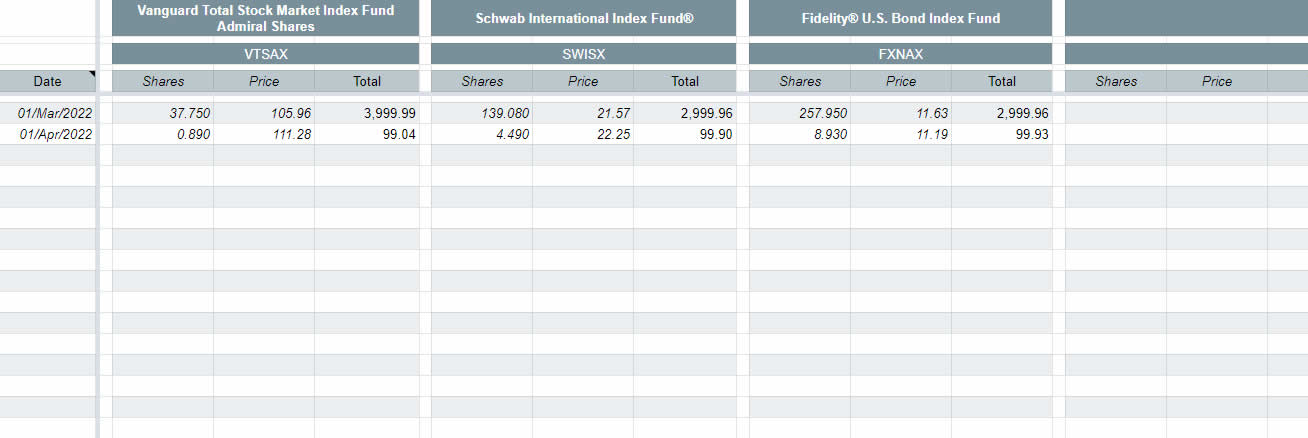
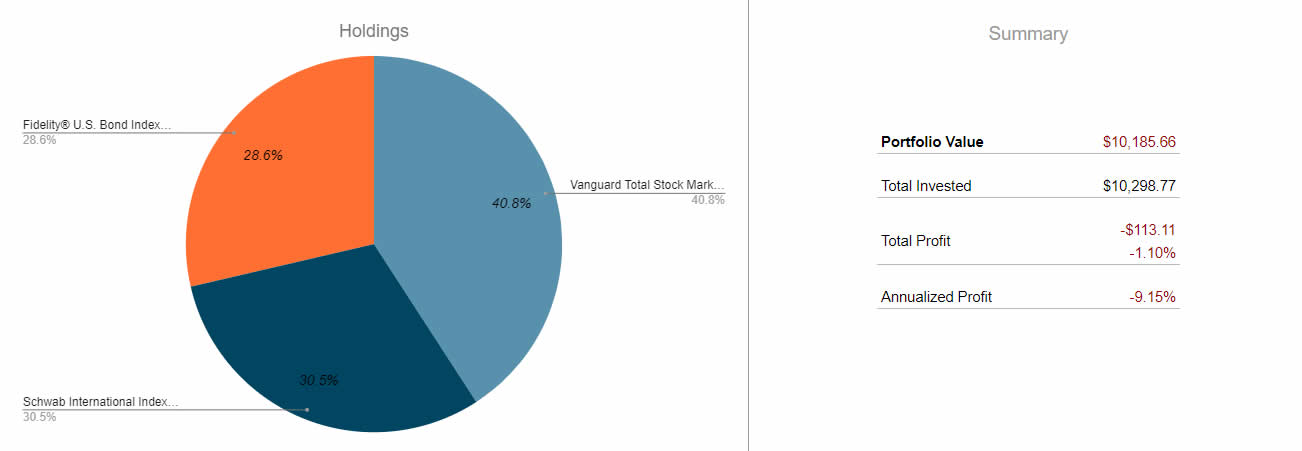
ETF/Mutal & Index Fund Distribution Chart
A pie chart to monitor how your funds are distributed and weighted. It also includes a summary so you can review the most important data about your portfolio’s performance, valuation, and returns (annualized and total).
Returns Chart
A bar chart to track returns by individual fund and overall.

Capital Invested vs Current Valuation Chart
A bar chart comparing your invested capital and its current valuation (real-time data).

Tabs
You can manage all these features and functionality with just 3 tabs.

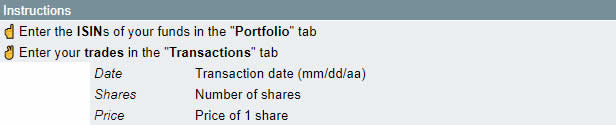
Instructions
Quick rundown of how the tracking sheet works: Enter your ISIN/Ticker and transactions.
Notes
Quick reference information reminding you about the main features of the tracking sheet.

Help, Error Prevention, and Error Control
Beyond the helpful notes scattered throughout the sheet to guide you, you’ll find support alerts and error controls.
To prevent mistakes (we’re all human), it’s important to have error controls in place. This way we avoid entering incorrect data, accidentally typing in formulas, deleting charts, etc.
That said, and while not recommended, just remember you can also disable the controls if you want to.
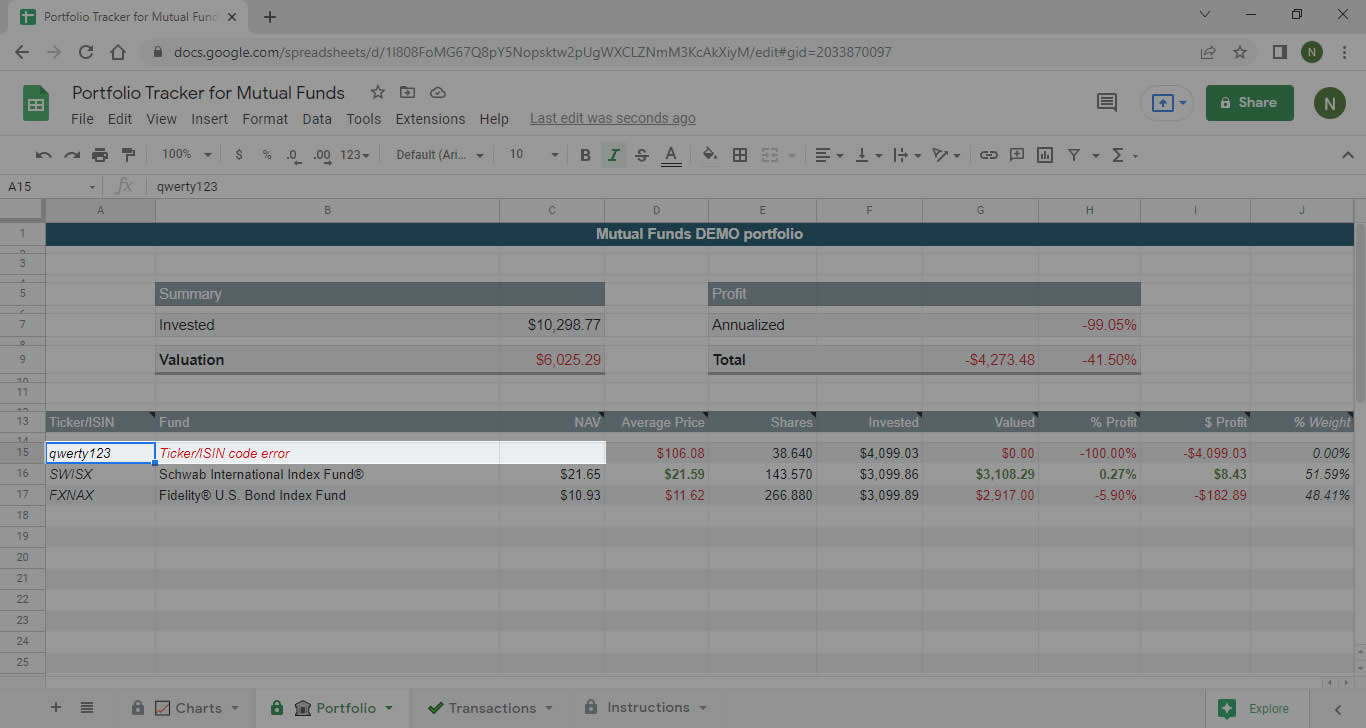
ISIN/Ticker Codes
Simply copy and paste the ISIN/Ticker code for your funds and ETFs. If the sheet detects any unusual characters or if you’ve entered the fund incorrectly, the sheet will alert you to correct it. The validation works with any fund available on the Financial Times website.
If you’re not sure where to find them, look up the ISIN/Ticker for your funds/ETFs in dollars at 🔎 ft.com and copy them over.
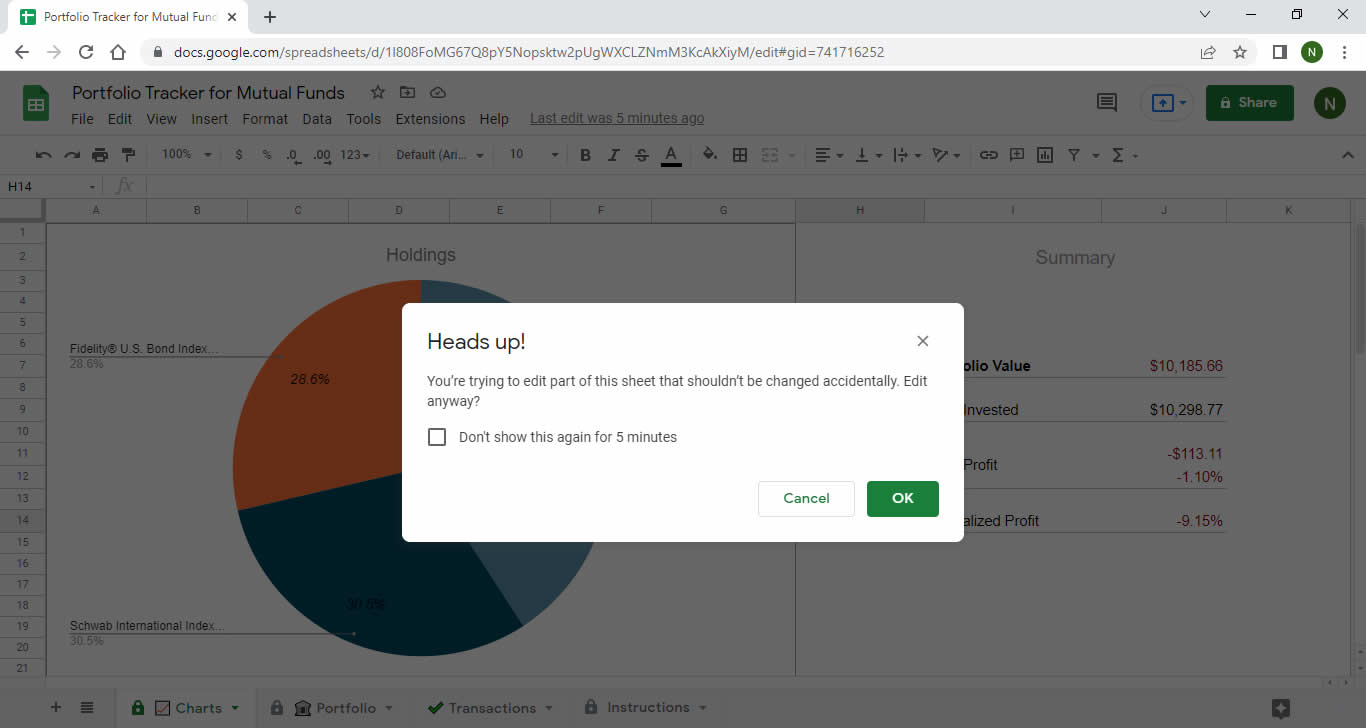
Automatic Charts
All charts are built from real-time data and the transactions you’re making.
Cells are protected to keep everything working smoothly.
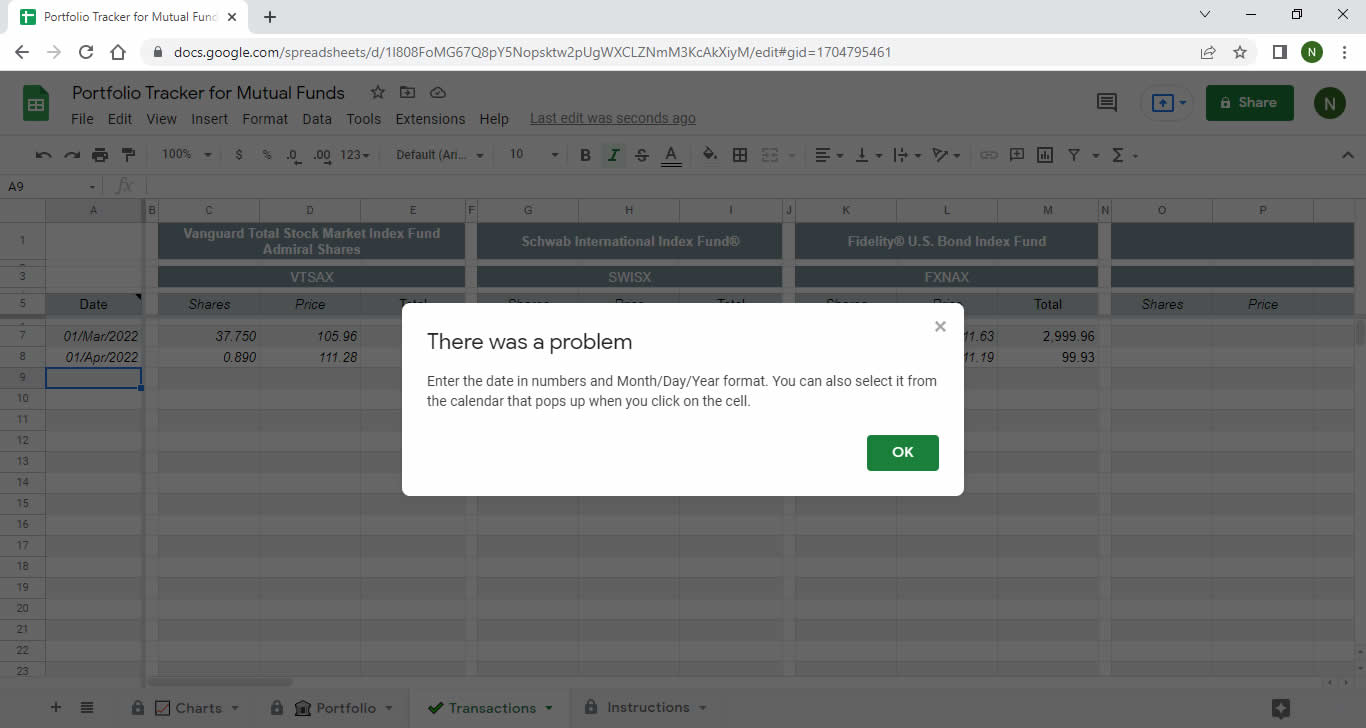
Transaction Date (Calendar)
Select the date of your trade (buy or sell).

Transaction Date (Manual)
Date validation when you enter dates manually.
Number of Shares
Data validation to track the quantity of shares for each transaction.

Transaction Price
Data validation for the buy or sell price per share.
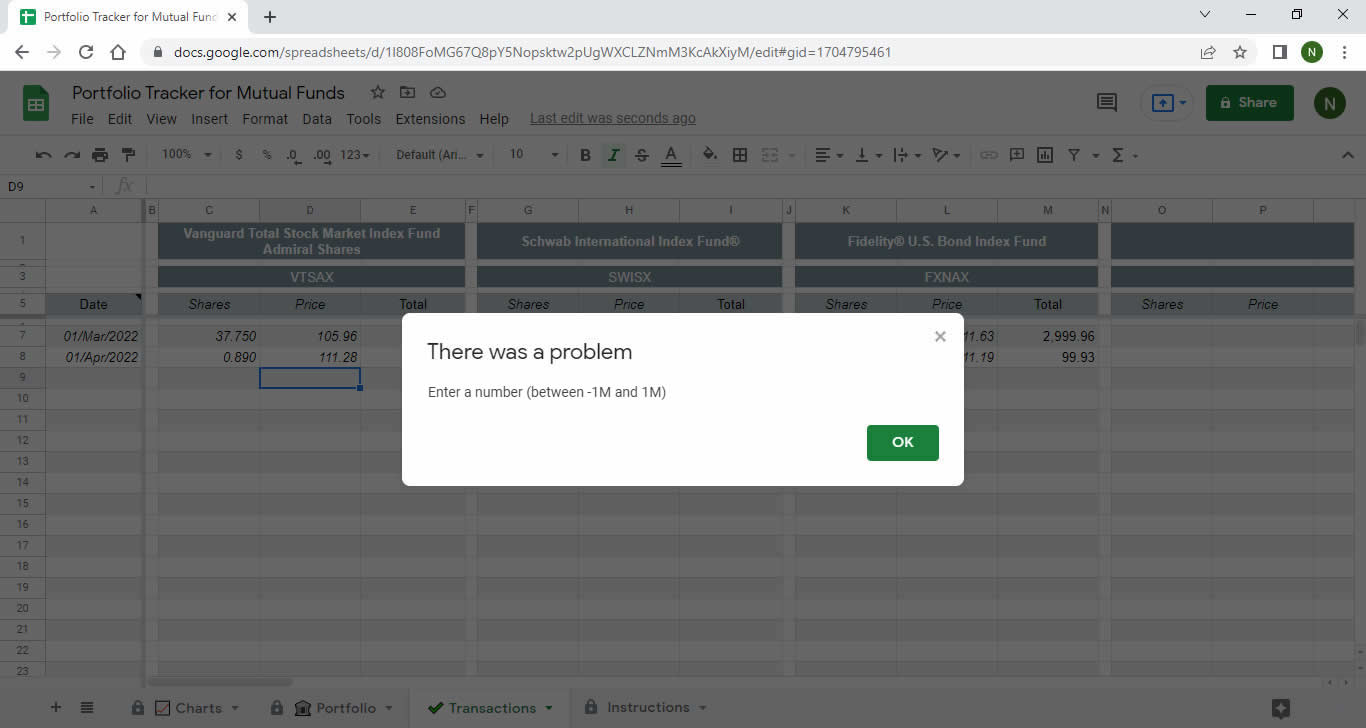
Transaction Total
Data validation to calculate the total amount of each transaction.

Reminders and Notes
Notes spread across multiple columns to remind you what type of data shows in each section.

One Click Away From Being Yours
Do you value your time? And the peace of mind that comes with a powerful tool to help you manage your investments? Then this is it.
Sure, you could keep wasting time searching for free templates that you probably won’t even use.
You could also keep using free templates and spend time adapting them… or start today with a tool that’s ready to work from day one.
But if you want to stop wasting time with clunky spreadsheets and get started right now, you’re one click away.
❌ I could’ve packaged this tool with a bunch of bonuses and told you it’s worth $499, but today only, as a special offer, I’m dropping it to $199…
We’ve all seen it a million times. I think if you’re looking for a tool to track your investments, you probably value clarity, control, and your time. So let me just be straight with you and talk to you like an adult ⤵️
Get Your Portfolio Tracking Spreadsheet Now
With its clean, minimalist design and powerful set of automated features, this template lets investors like you monitor your fund and ETF portfolio.
One-time payment · Instant access · Google Sheets
🛡️ 30-day money-back guarantee
Pay once. It’s yours forever. No subscriptions, no limitations.
When you buy, you get:
✅ Instant access to the template in Google Sheets
✅ Portfolio tab to see valuation, returns, and allocation
✅ Transactions tab to log your buys and sells
✅ Automatic distribution and returns charts
✅ Validations to prevent date, amount, and share errors
✅ Step-by-step instructions built right into the sheet
✅ Real-time price updates from Financial Times
✅ Unlimited use for all your own funds and ETFs
And for a fraction of what you’ll waste in lost hours building (and searching for) your own spreadsheet.
🛡️ 100% Guarantee 🔒 Risk-Free Purchase
I’m making this even easier for you so you can try the template without any risk.
If during the first 30 days you realize it’s not what you need or you run into any issues using it, just reach out and I’ll refund your money.
💡 Pro tip: to save yourself time, watch this quick video before you buy where I walk you through how it works.
What People Who Already Know Me Are Saying
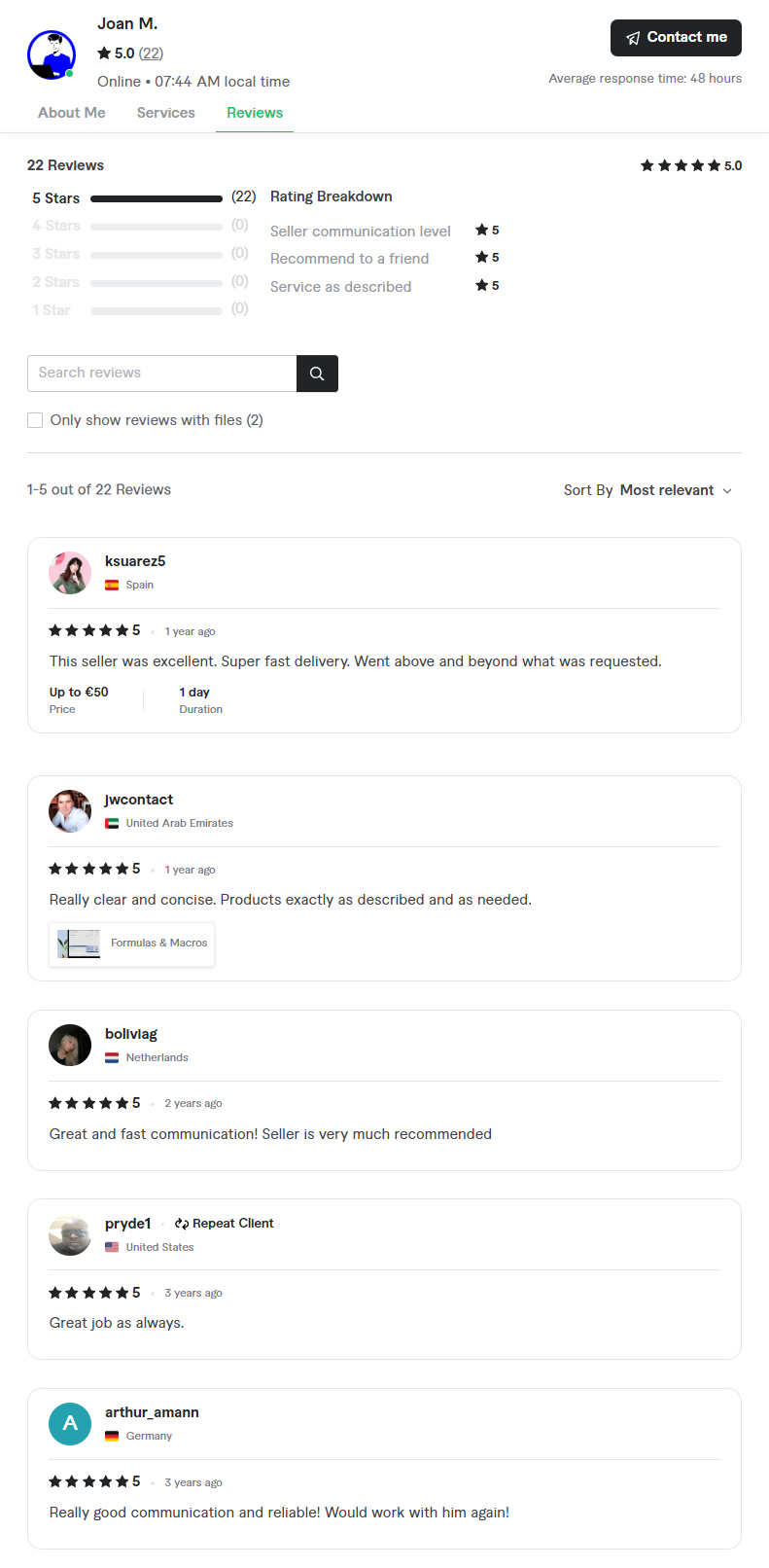
What people from around the world have to say who’ve already trusted my info products, templates, and services. For example, the European version 🇪🇺 (in EUR) of this ETF Portfolio tracker spreadsheet (in Spanish).
You will find the transcript of the reviews after this screenshot.
“
This seller was excellent. Superfast delivery. Went above and beyond what was requested.
—ksuarez5
España
“
Really clear and concise. Product exactly as describe and as needed.
—jwcontact
United Arab Emirates
“
Great and fast communication! Seller is very much recommended
—bolivia
Netherlands
“
Great job as always.
—pryde1
United States
“
Really Good communication and reliable! Would work with him again!
—arthur_amann
Germany
More Testimonials
Some reviews and ratings from people I’ve helped learn about investing (link):

One-time payment · Instant access · Google Sheets
🛡️ 30-day money-back guarantee
Frequently Asked Questions
Here are the most common questions and answers:
The sheet includes a control and organization tool so you can track your investment funds and ETFs, log your buys and sells, and visualize your portfolio performance clearly.
The spreadsheet is designed so you can organize your investment fund and ETF portfolio, record every move you make, and track how they’re performing over time, which helps you make more informed decisions.
No, you don’t need to be an expert. The sheet is structured simply and clearly so you can understand how to fill it in and track your investment funds and ETFs without any hassle. Plus, on this same page you’ll find a video and example walkthrough.
It lets you keep detailed track of every move, gain, or loss, and make informed adjustments based on your portfolio’s actual performance. This helps you optimize your financial decisions.
You’ll find clear, simple instructions right inside the sheet to get started. Plus, this page includes a video and example demo. But if you still have questions, you can reach out to me for personalized support.
Yes, the spreadsheet is available in Google Sheets, so you can access it from any device with an internet connection and your Gmail account—whether it’s your computer, tablet, phone, or anything in between.
Get Your Portfolio Tracking Spreadsheet Now
With its clean, minimalist design and powerful set of automated features, this template lets investors like you monitor your fund and ETF portfolio.
One-time payment · Instant access · Google Sheets
🛡️ 30-day money-back guarantee
ETF Portfolio Tracker in EUR
⚡ And if you invest in EUR or from Europe 🇪🇺, in this page 🇪🇸 you will find the template for European ETFs, mutual and index funds (Spanish version).
| 2026-09-20 | Header video |
| 2026-06-08 | Structured data has been added |
| 2026-06-01 | Page publication |
